
share: 


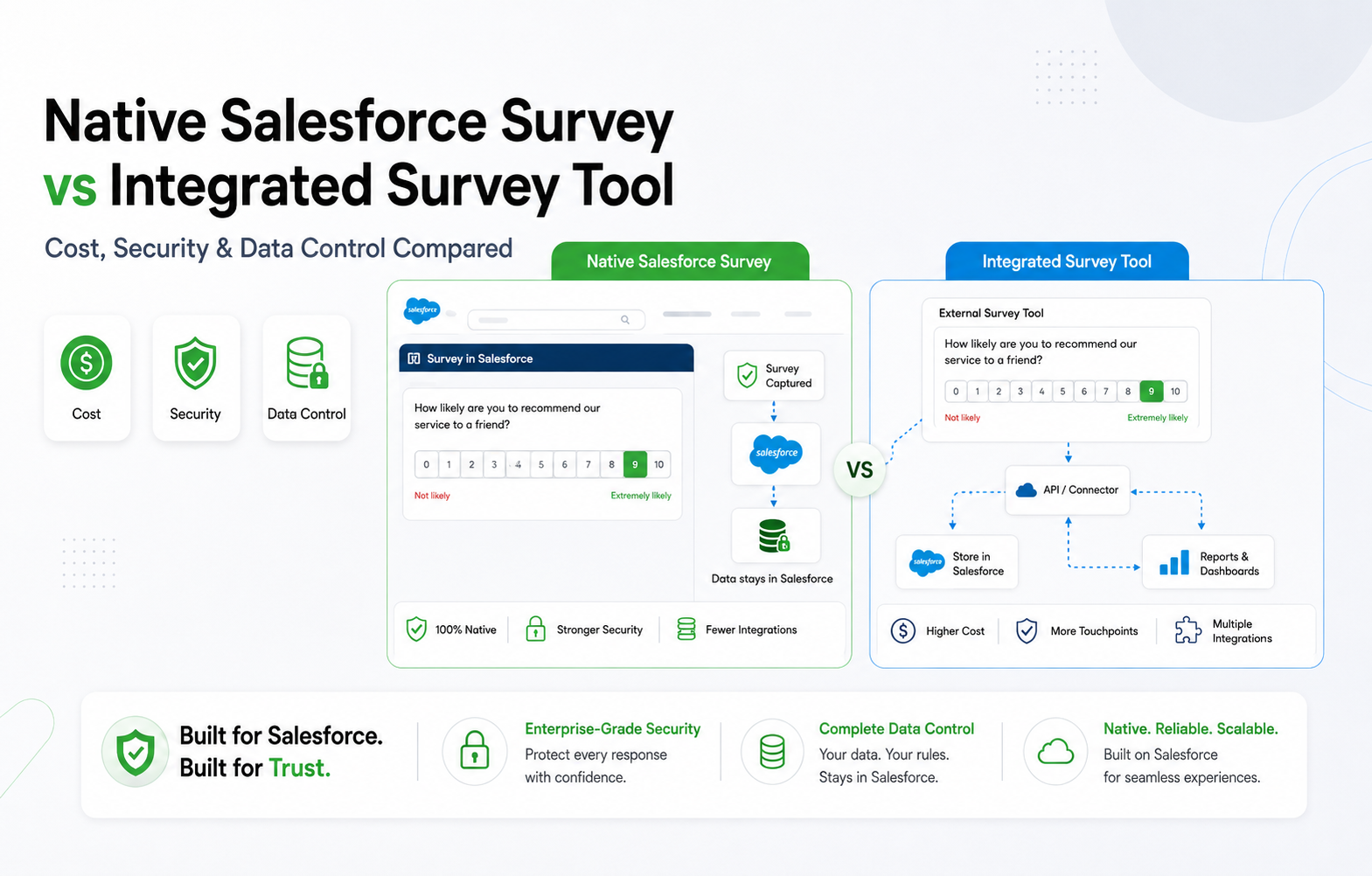
Salesforce survey tools split into two architectures: native apps that run entirely inside your org, and integrated tools that live on outside servers and sync data in through an API. That single difference decides what you pay, how exposed your data is, and who actually controls it.
Native tools store every response as a Salesforce record. Integrated tools store it somewhere else first, then push a copy over. For teams weighing GDPR, HIPAA, or SOC 2 obligations, that’s not a minor technical detail. It’s the whole decision.
This guide breaks the choice into three parts: what each option actually costs, how each one handles security, and who keeps control of the data once a customer hits submit.
What Is a Native Salesforce Survey Tool?
A native Salesforce survey tool is built directly on the Salesforce platform. There’s no separate database, no external server, and no sync job. Survey questions, responses, and reports are Salesforce objects, the same as your Accounts or Cases.
Salesforce’s own Feedback Management add-on is one example. AppExchange apps like SurveyVista are another, built to extend that native model with more question types, branching logic, and automation than the built-in tool offers.
Because everything sits inside your org, native tools inherit your existing Salesforce security model automatically. Profiles, permission sets, and field-level security apply to survey data the same way they apply to every other record in your CRM. You can see how this plays out across a full feature set on SurveyVista’s platform overview.
What Is an Integrated Survey Tool?
Survey tools that integrate with Salesforce work differently. The survey itself is built and hosted on the vendor’s own platform. Responses are collected there first, then mapped and pushed into Salesforce through an API connection, a managed package, or middleware.
This category includes tools like Qualtrics, SurveyMonkey, Medallia, and GetFeedback. Many offer strong survey design, wide distribution channels (SMS, WhatsApp, in-app), and mature analytics.
What they don’t offer is a single source of truth. Your survey data technically exists in two places: the vendor’s cloud and your Salesforce org, connected by a sync process that can lag, fail, or drift out of alignment.
Native vs Integrated: The Quick Comparison
| Factor | Native Salesforce Survey Tool | Integrated Survey Tool |
| Where data lives | Inside your Salesforce org only | External vendor servers, then synced in |
| Setup | Install from AppExchange, configure, done | API/middleware integration project |
| Data availability | Instant, no sync delay | Batch or near-real-time sync |
| Security review | Covered by your Salesforce approval | Separate vendor security assessment required |
| Channel coverage | Email, web, limited SMS | Email, SMS, WhatsApp, in-app, kiosk |
| Ongoing maintenance | None (no integration to maintain) | API monitoring, field mapping, version upgrades |
Cost Comparison: What Salesforce Surveys Pricing Actually Looks Like
The sticker price on either option is only part of the bill. The real comparison needs to include what it costs to connect, secure, and maintain each one over a year, not just what it costs to buy.
Salesforce Feedback Management is available as an add-on to Service Cloud Enterprise and Unlimited editions. Service Cloud Enterprise is priced at $175/user/month, while Unlimited is $350/user/month, with Feedback Management licensed separately on top of the Service Cloud subscription. For a mid-size CS team, that edition requirement alone can push the real cost into six figures a year before a single survey goes out.
Integrated third-party tools often look cheaper on the vendor’s pricing page. The costs that don’t show up there: a typical Salesforce integration build runs an estimated $8,000 to $18,000 one time, plus ongoing monitoring and field-mapping maintenance that industry estimates put at 10 to 20 hours a month. At a $100 fully loaded hourly rate, that’s roughly $12,000 to $24,000 a year, every year, just to keep the sync working.
Native AppExchange apps avoid both problems. SurveyVista’s published pricing, for example, starts at $2,999 a year for its Core tier (2 user licenses, unlimited surveys and responses) and $7,499 a year for Premium (5 licenses, AI sentiment analysis, closed-loop automation). There’s no integration project because there’s nothing to integrate, and no separate maintenance line because there’s no external sync to babysit. A side-by-side of native and third-party options is also available in this comparison of top Salesforce survey tools.
Checklist: cost questions to ask any Salesforce survey vendor
- Is Salesforce data sync included, or a separate paid add-on?
- What Salesforce edition does this require?
- Who pays for the integration build: your team, the vendor, or a third-party consultant?
- What’s the estimated monthly maintenance hours once it’s live?
- Is there a per-response fee, or unlimited responses per license?
Security and Data Control: Where the Response Actually Lives
With an integrated tool, a customer’s survey response travels through several hops before it reaches Salesforce: the vendor’s web server, their database, an API call authenticated by a stored credential, and finally your org. Each hop is a point where data can be intercepted, delayed, or exposed if that vendor’s security posture slips. According to the 2026 Verizon Data Breach Investigations Report, third-party involvement in breaches jumped to 48% of all incidents, up 60% year over year. Every connected vendor is a door someone else has to keep locked.
With a native tool, the response is written directly to a Salesforce object. There’s no external database, no API credential to steal, and no second copy of the data sitting outside your trust boundary. SurveyVista’s security documentation puts it plainly: survey data is stored only in the customer’s Salesforce instance, protected by Salesforce Shield Platform Encryption where configured, with no separate SurveyVista certification required because Salesforce’s own certifications already apply.
That inheritance matters for compliance teams specifically. Salesforce maintains SOC 2, ISO 27001, GDPR, HIPAA, and several other certifications, documented publicly at Salesforce’s Compliance Site. A native app that never moves data off-platform stays inside that certified boundary automatically. An integrated tool introduces a second vendor, which means a second SOC 2 report to request, a second breach notification process to track, and a second audit scope to defend.
Data control checklist
- Does survey data ever leave Salesforce, even temporarily?
- Does the vendor need its own security certification, or does it inherit Salesforce’s?
- Who is the data processor of record under your GDPR agreements: Salesforce, or a third party?
- If the vendor is breached, does your Salesforce org’s security posture change at all?
When an Integrated Tool Still Makes Sense
Native isn’t the right call for every team. If your survey program genuinely needs SMS, WhatsApp, or in-app distribution at scale, most native tools (including basic Feedback Management) fall short there. If you’re running deep academic-style research with advanced statistical modeling, a specialist platform like Qualtrics may still be the better fit despite the added integration overhead.
The honest question isn’t “native or integrated” as a blanket rule. It’s whether the specific gaps an integrated tool fills are worth the recurring cost, sync delay, and expanded attack surface for your specific program.
How to Choose: A Practical Decision Checklist
- List your required channels. Email and web only? Native covers it. Need SMS or WhatsApp at volume? You likely need a third-party layer.
- Map your compliance requirements. HIPAA, GDPR, or data residency rules favor keeping data inside Salesforce’s certified boundary.
- Calculate the real annual cost, including integration build, maintenance hours, and any separate security audit, not just the license fee.
- Check your Salesforce edition. Feedback Management requires Enterprise or Unlimited; confirm your org already qualifies before budgeting.
- Ask what happens to the data if the vendor is breached or shuts down. This question alone eliminates several options quickly.
Why This Decision Is Urgent Right Now
GetFeedback Direct is shutting down on December 31, 2026. Teams running it need a migration plan now, not in November. That deadline is prompting a broader wave of Salesforce teams to re-evaluate whether they want to migrate to another integrated tool or move to a native architecture and remove the integration question permanently.
SurveyVista has already run this migration for organizations like Hire Heroes USA and FourBlock, both moving off GetFeedback onto a native platform without losing historical survey data in the process.
If you’re evaluating Salesforce survey tools as part of that same decision, start by reading why native architecture matters before comparing feature lists, since the architecture decision shapes everything downstream of it. Detailed setup steps are also covered in the SurveyVista knowledge base if you want to see what implementation actually looks like day to day.
Frequently Asked Questions
Is Salesforce Feedback Management free?
No. It’s an add-on available only on Enterprise ($175/user/month) or Unlimited ($350/user/month) Service Cloud editions, with the Feedback Management license itself priced on top of that base edition cost.
Can I migrate from an integrated tool to a native one without losing historical survey data?
Yes, in most cases. Migration typically involves exporting historical responses from the old platform and importing them as Salesforce records, which several native vendors, including SurveyVista, have supported for organizations moving off GetFeedback and similar tools.
Do native Salesforce survey tools support SMS or WhatsApp distribution?
Some do, though usually with narrower functionality than dedicated SMS or messaging platforms. If multi-channel distribution at scale is a hard requirement, that’s often the strongest argument for pairing Salesforce with a third-party integration.
What Salesforce edition do I need to run a native survey app?
This varies by vendor. Salesforce’s own Feedback Management requires Enterprise or Unlimited edition. Some AppExchange apps, including SurveyVista, are compatible starting at Enterprise edition; always confirm current edition requirements directly with the vendor before purchasing.
Pricing and edition details in this article reflect publicly available information as of the Last Updated date above. Confirm current pricing directly with Salesforce and the relevant vendor before making a purchasing decision, as software pricing changes frequently.
More Like This



Rajesh Unadkat 
Founder and CEO
Rajesh is the visionary leader at the helm of SurveyVista. With a profound vision for the transformative potential of survey solutions, he founded the company in 2020. Rajesh's unwavering commitment to harnessing the power of data-driven insights has led to SurveyVista's rapid evolution as an industry leader.
Connect with Rajesh on LinkedIn to stay updated on the latest insights into the world of survey solutions for customer and employee experience management.