share: 


Your Salesforce NPS score only matters if a low one actually triggers something. Most teams collect the score, look at a dashboard, and stop there. The response that should have opened a Case and assigned a retention Task instead sits in a report nobody checks until the account is already gone.
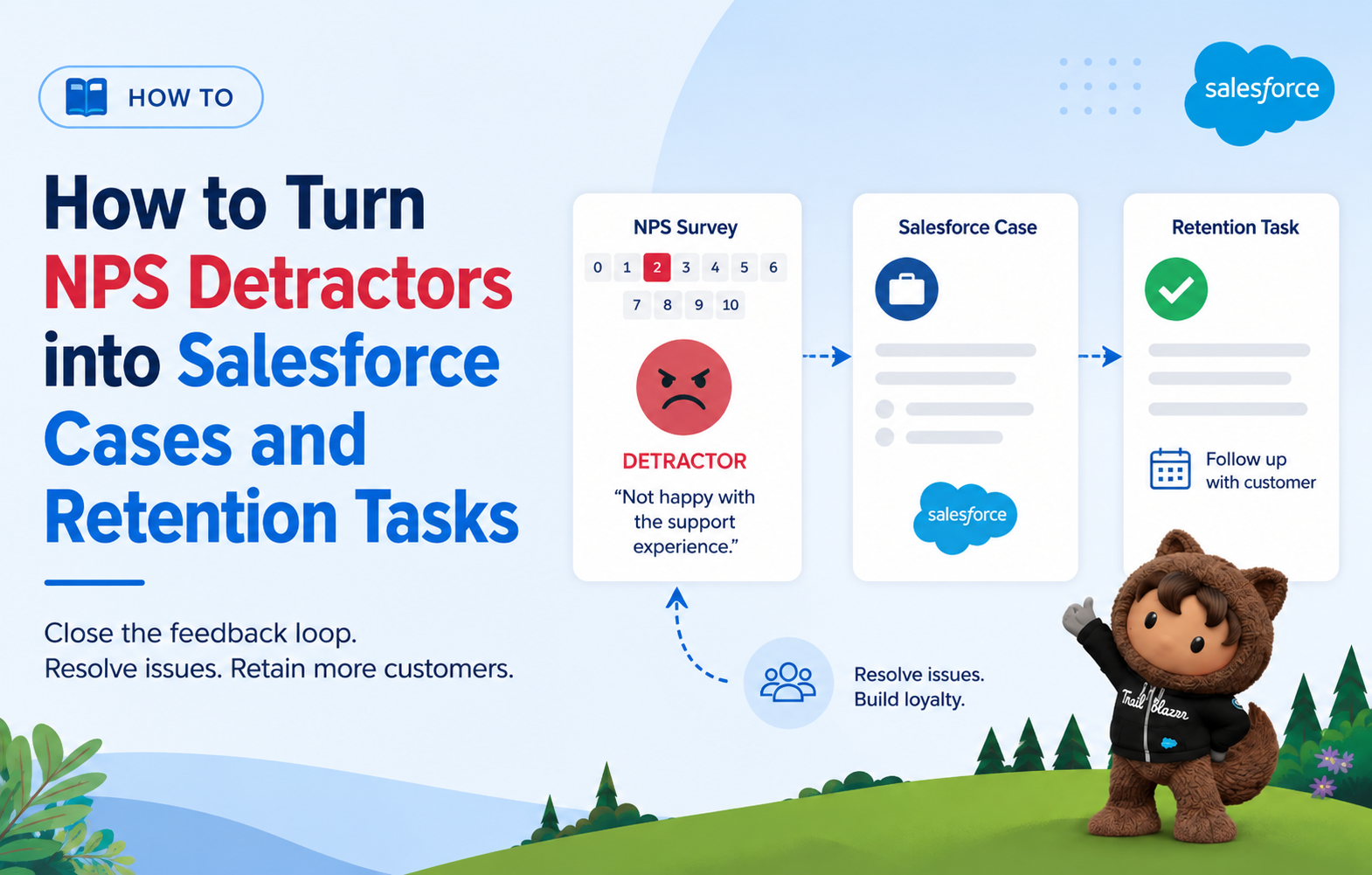
This guide covers exactly how to close that gap: the Flow logic that turns a Detractor response into a Case, assigns a retention Task to the right owner, and sets an SLA on the follow-up, all inside Salesforce, without a spreadsheet or a manual review step in between.
What Is NPS in Salesforce?
Net Promoter Score is a customer loyalty metric built on one question: “How likely are you to recommend us to a friend or colleague?” on a 0-10 scale. Bain & Company, which created the methodology in 2003, defines the score as the percentage of promoters minus the percentage of detractors, a number that can range from -100 to +100. A net promoter score survey run through Salesforce works the same way, with one addition: every response lands directly on a CRM record instead of a separate report.
In Salesforce specifically, a net promoter score Salesforce integration ties the survey to a CRM event, and the response is written back to a record, usually a Contact or Account, so the score sits next to renewal dates, contract value, and support history instead of living in a separate dashboard.
That’s what makes a Salesforce NPS score actionable rather than just informational: the CSM sees the score in the same place they see everything else about the account. The SurveyVista platform is built around exactly this idea, keeping the survey, the score, and the resulting workflow inside the same system.
Promoters, Passives, and Detractors: What the Score Actually Means
Every NPS response sorts into one of three groups. Segmenting NPS promoters and detractors correctly, rather than treating every response the same way, is what determines whether the follow-up workflow actually works:
| Segment | Score | What it signals |
| Promoters | 9-10 | Loyal customers likely to recommend you and expand |
| Passives | 7-8 | Satisfied but unenthusiastic, vulnerable to competitors |
| Detractors | 0-6 | Unhappy customers at real risk of churning or badmouthing you |
A 0-6 score paired with an open-text comment is usually the clearest churn signal a CS team gets, and it arrives with a built-in explanation of the problem.
Where a Salesforce NPS Score Should Live vs Where the Case Belongs
The NPS score itself is relational data. It belongs on the Contact record, and rolled up to the Account for health tracking. It is not tied to one interaction, so it shouldn’t live on a Case.
A Case in Salesforce represents a specific customer issue or problem that needs to be worked and closed. When a Detractor explains why they scored you low, that explanation is a specific, workable problem, exactly what a Case is built to track. So the score stays on the Contact. The issue it describes becomes a Case. The follow-up action becomes a Task. Three different objects, three different jobs, all connected to the same record.
Step-by-Step: Turn a Detractor Response into a Salesforce Case and Task
Here’s the Flow logic, in order.
- Capture the score with the open-text follow-up. Every NPS survey should ask “What’s the main reason for your score?” immediately after the rating. Without it, you get a number with no context to act on.
- Filter for Detractor range. Set a Flow decision element that checks whether the score falls between 0 and 6. Anything in that range routes down the detractor path; 7-10 routes elsewhere.
- Create the Case automatically. Flow creates a new Case record, populates the Subject with the score and a snippet of the open-text comment, sets Origin to “NPS Survey,” and links it to the Contact and Account.
- Create the retention Task and assign it. A second Create Records element generates a Task tied to the new Case, assigned based on account tier; for example, strategic accounts route to the CSM plus a manager notification, mid-market routes to the CSM alone, and unassigned accounts fall to a CS queue.
- Set the SLA. Add a due date to the Task, typically 48 hours out, so follow-up has a deadline instead of sitting indefinitely.
- Check for duplicates. Before creating a new Case, add a Get Records step that checks for an open Case from the same Contact in the last 30 days. If one exists, add the new response as a comment instead of opening a second Case for the same underlying issue.
- Log the outcome. When the CSM closes the Case, capture the resolution on the Contact record. That history is what lets you measure whether the intervention actually changed the customer’s sentiment next cycle. Detailed setup walkthroughs for each of these Flow elements are also covered in the SurveyVista knowledge base.
Salesforce’s Flow Builder handles every one of these steps with clicks, not code, which is why this workflow doesn’t require a developer to build or maintain.
Field Mapping Reference for Detractor Cases and Tasks
| Field | Object | Purpose |
| NPS_Score__c | Contact | Raw 0-10 score from the most recent response |
| NPS_Category__c | Contact | Auto-classified Promoter/Passive/Detractor picklist |
| Case Subject | Case | Auto-populated with score and comment snippet |
| Case Origin | Case | Set to “NPS Survey” for reporting and filtering |
| Task Due Date | Task | SLA deadline, typically 48 hours from creation |
| Task Owner | Task | Assigned by account tier or ownership rule |
| Resolution_Notes__c | Contact | Outcome logged after the Case closes |
Setting SLAs and Ownership for Detractor Follow-Up
Before launch, decide the routing rule in plain terms: which accounts get a CSM directly, which fall to a shared queue, and who gets notified if a Task goes overdue.
A simple three-tier rule (strategic, mid-market, unassigned) covers most teams without over-engineering the logic. Review closure rates monthly.
If a meaningful share of Detractor Tasks are closing past their SLA, that’s a capacity problem worth surfacing before it shows up as a churn number.
NPS Survey Timing: When to Trigger the Survey vs the Case
When to send the NPS survey is about the relationship, not a single interaction. Quarterly cadences, post-onboarding milestones, and renewal windows are common triggers. Sending the survey right after a support case closes is a common mistake: that measures the interaction, not the relationship, and it’s a job better suited to a CSAT survey.
When to create the Case is about the response, not the schedule. The Case-and-Task Flow fires the instant a Detractor score lands, regardless of when the survey itself went out. Timing the survey and reacting to the response are two different clocks, and conflating them is why many programs end up with retention actions that fire too late to matter.
Why Native Automation Beats a Manual Review Process
If the NPS platform lives outside Salesforce, the Flow can’t fire until the data lands, and that sync delay is exactly the gap that lets a recoverable Detractor become a lost account.
This is the practical reason CX and Customer Success teams increasingly run NPS natively rather than through a connected third-party survey tool: a native Salesforce survey tool writes the response directly to the Contact record, so the Case-and-Task Flow described above can fire in real time instead of waiting on a batch sync.
One SurveyVista case study shows this in practice: a global interim leadership firm used native NPS and CSAT data inside Salesforce to strengthen customer relationships and drive advocacy, without a separate integration layer between the survey and the CRM record it needed to update.
If you’re mapping out this kind of workflow for your own org, the SurveyVista why-native breakdown and pricing page cover what’s included natively versus what still needs custom Flow work.
Frequently Asked Questions
Should a Detractor response create a Case, a Task, or both?
Both, and they serve different purposes. The Case documents and tracks the underlying issue through resolution. The Task is the actionable, assigned follow-up with a due date. Skipping the Case means you lose the documented record; skipping the Task means nobody’s actually assigned to respond.
How fast should a team follow up with an NPS Detractor?
Within 48 hours is a common standard. Detractor sentiment doesn’t improve by waiting, and a delayed response after a bad score often reads to the customer as confirmation that the feedback didn’t matter.
Can I prevent duplicate Cases from a customer who scores low repeatedly?
Yes. Add a Get Records check in the Flow that looks for an existing open Case from the same Contact within a set window (commonly 30 days) and append the new response to that Case instead of creating a second one.
Does a Passive score (7-8) need the same Case-and-Task workflow?
Not the same one. Passives are worth a lighter-touch nurture, like a check-in or a relevant feature update, rather than a full Case. Reserve the Case-and-Task Flow for the 0-6 Detractor range where the risk is highest.
More Like This




Rajesh Unadkat 
Founder and CEO
Rajesh is the visionary leader at the helm of SurveyVista. With a profound vision for the transformative potential of survey solutions, he founded the company in 2020. Rajesh's unwavering commitment to harnessing the power of data-driven insights has led to SurveyVista's rapid evolution as an industry leader.
Connect with Rajesh on LinkedIn to stay updated on the latest insights into the world of survey solutions for customer and employee experience management.