share: 


How to Get Feedback From Customers Automatically Using Salesforce
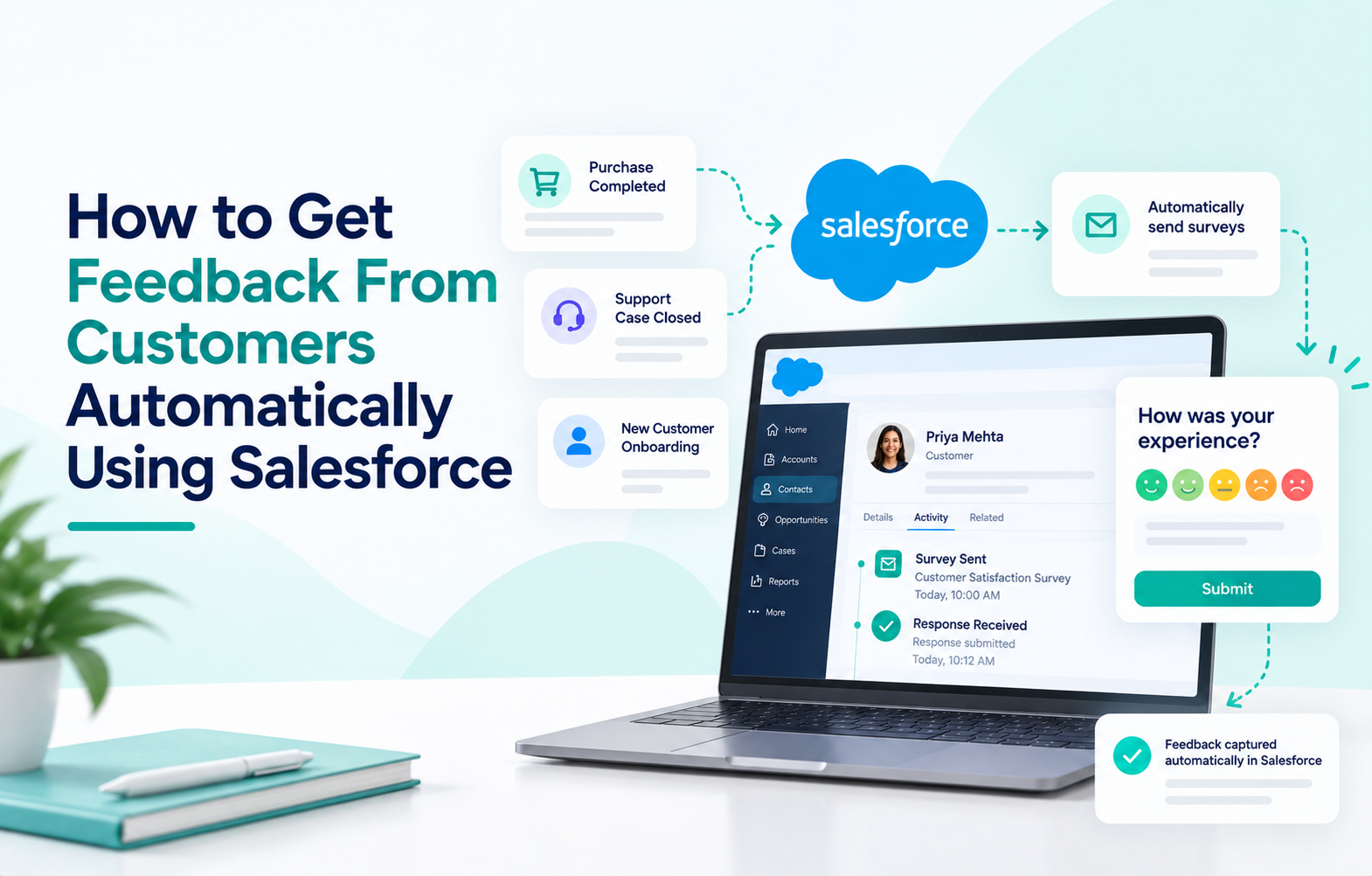
If you’re still sending customer surveys manually, copying responses into spreadsheets, and hoping someone on your team remembers to follow up, you’re losing both time and signal. Customer feedback automation inside Salesforce eliminates that entire chain by collecting responses, scoring them, mapping them to records, and triggering next steps without anyone clicking “send.”
This guide covers seven ways to automate customer feedback in Salesforce, from the built-in tools that ship with every org to native AppExchange apps that handle the heavy lifting for you. Whether you’re looking at customer feedback software for the first time or replacing a manual process, we’ll break down what each method does, where it falls short, and which one fits your actual use case.
-
Salesforce Surveys: The Built-In Customer Satisfaction Survey
Salesforce includes native Salesforce surveys out of the box. You can build basic surveys directly inside Setup, and they’ll work with Experience Cloud sites for external distribution. If you want a simple post-case CSAT survey, this is the fastest way to get started without installing anything.
You can configure Salesforce to automatically email a survey when a case closes through Support Settings, or tie it to case auto-response rules for more specific triggering. Two sample surveys come pre-loaded when you enable the feature.
Key features:
- Built into every Salesforce org with no extra installation required
- Sends automatically on case closure or auto-response rule match
- Responses stored as Salesforce records on standard survey objects
- Works with Experience Cloud sites for external-facing distribution
Limitations:
- Limited question types and design customization compared to AppExchange alternatives
- No built-in sentiment analysis, AI scoring, or advanced branching logic
- Requires Feedback Management add-on for anything beyond basic functionality
- Feedback Management is only available on Enterprise ($175/user/month) or Unlimited editions
If you need basic CSAT after case closure and nothing more, the built-in tool works. If you need NPS programs, multi-channel distribution, or AI-powered analysis, you’ll outgrow it quickly.
-
Salesforce Flow for Record-Triggered Survey Automation
Salesforce Flow is how most teams automate customer surveys tied to specific CRM events. A record-triggered Flow watches for a field change (like a Case status moving to “Closed”), then fires an action automatically.
For survey automation specifically, that action can be creating a survey invitation, sending an email with a survey link, or creating a Survey Result record that a native app picks up and dispatches. Trailhead has a dedicated module on building Flows to send survey invitations that walks through the full setup.
Key features:
- Triggers on any record event: case closure, opportunity stage change, onboarding milestone
- No-code configuration through the Flow Builder visual interface
- Can create tasks, send emails, update records, and create survey invitations in one Flow
- Supports scheduled paths for delayed sends (e.g., survey 24 hours after case closure)
Limitations:
- Each survey program typically needs its own Flow, which adds admin maintenance over time
- Flow handles the trigger but not the survey itself, so you still need a survey builder
- Complex multi-step Flows with error handling can run to 20-30 elements
- Salesforce ended support for Workflow Rules and Process Builder as of December 2025; Flow is the only option now
Flow is the right tool for triggering surveys. It’s not a survey builder, though, so you’ll pair it with either Salesforce’s native surveys or a dedicated app like SurveyVista.
SurveyVista’s Pre-Built Dispatch and Response Mapping
SurveyVista is a 100% native Salesforce survey app that handles most of the automation chain out of the box. Instead of building a full Flow every time you want to send a survey, SurveyVista ships with a pre-built dispatch mechanism: when a Survey Result record is created (by a simple 3-step Flow or by its own Record Lifecycle Maps feature), the app handles sending, tracking, scoring, and mapping automatically.
This is what makes it different from both the built-in Salesforce survey tool and external platforms like SurveyMonkey or Qualtrics. The survey, the response, the score, and the follow-up action all happen inside Salesforce on the same record.
Key features:
- Pre-built survey dispatch that fires when a Survey Result record is created
- Automatic score calculation for NPS, CSAT, and CES on survey completion
- Response mapping writes answers directly to Contact, Account, Case, or custom objects
- Record Lifecycle Maps monitor objects and trigger surveys based on field conditions without building Flows
- Multi-channel distribution: email, SMS, chat, community pages, public URL, and API
- AI-powered sentiment analysis (Enterprise edition) classifies open-ended responses automatically
- Scheduled archiving of closed surveys runs without manual intervention
Limitations:
- Requires a SurveyVista license (Core starts at $2,999/year, Premium at $7,499/year)
- Record-triggered sends still need a small Flow (3 steps) unless you use Record Lifecycle Maps
- AI sentiment features are only available in the Enterprise edition
If you want the broadest automation coverage with the least admin maintenance, SurveyVista is the strongest native option. Check pricing and edition details here.
Record Lifecycle Maps (RLM) for Zero-Flow Automation
Record Lifecycle Maps are SurveyVista’s answer to the “I don’t want to build a Flow for every survey program” problem. RLMs monitor standard or custom Salesforce objects and trigger surveys when field conditions are met, without any Flow configuration at all.
For example, an RLM can watch the Opportunity object and send a feedback survey when Stage changes to “Closed Won.” Another can watch a custom Onboarding object and trigger a 30-day check-in survey when a milestone field is marked complete.
Key features:
- Monitors any Salesforce object for field-level condition changes
- Triggers survey dispatch automatically based on those conditions
- No Flow Builder work required for setup or maintenance
- Response mapping and follow-up workflows still apply as normal
Best for: Teams running multiple survey programs (NPS, CSAT, onboarding, renewal) that don’t want each one requiring its own Flow. Learn more about Record Lifecycle Maps.
Email and Chat Surveys Without Any Trigger Configuration
Not every automated customer survey needs a record-triggered event. Some channels distribute surveys passively, with no trigger configuration at all.
Public URL: Every SurveyVista survey generates a shareable link you can embed in email signatures, QR codes, landing pages, or post-purchase confirmation screens. No Flow, no trigger, just a link that’s always live.
Chat handoff: Surveys can auto-fire when a Salesforce Chat session ends. The customer sees the invitation the moment the agent closes the session, capturing feedback while the experience is still fresh.
Community pages: Embedded survey components on Experience Cloud pages collect responses tied to the logged-in Contact record. The page itself is the trigger.
Best for: Service teams wanting always-on feedback collection without admin involvement per send.
Closing the Loop: What Happens After the Response Lands
Collecting automated customer feedback is half the job. The other half is what happens when a response arrives. This is where most programs fall apart, and where native Salesforce automation has the biggest advantage.
Because SurveyVista responses are Salesforce records from the moment of submission, you can configure standard Salesforce workflows to act on them instantly:
- A detractor NPS score creates a Case and assigns it to the account’s CSM
- A low CSAT score triggers a retention Task with a 48-hour SLA
- A positive score with a testimonial comment routes to your marketing team
- A competitor mention flags the account for a competitive review
None of these actions require a separate integration, export, or middleware layer. The response is already a Salesforce record sitting on the right Contact and Account. Learn how SurveyVista captures feedback across the full customer lifecycle.
CRM Customer Feedback: Why Native Beats Integrated
Every survey tool on the market claims Salesforce integration. The practical difference between “integrates with Salesforce” and “runs inside Salesforce” shows up in three places:
Speed. A native survey response writes to a Salesforce record instantly. An integrated tool writes to its own database first, then syncs to Salesforce minutes or hours later. By the time the CSM sees the score, the moment to act may have passed.
Maintenance. A native app requires zero sync monitoring, zero field-mapping maintenance, and zero API troubleshooting. An integrated tool requires all three, permanently, for as long as you use it.
Security. A native app inherits Salesforce’s own security certifications (SOC 2, ISO 27001, HIPAA via Health Cloud). An integrated tool introduces a second vendor, a second security posture, and a second breach surface to audit.
If you want CRM customer feedback that triggers real-time action without a maintenance burden, native is the architecture to pick. If your question is how to collect customer feedback automatically without building that maintenance layer, native Salesforce customer feedback tools answer it directly. See why SurveyVista is built native-first.
Frequently Asked Questions
How long does it take to set up automated surveys in Salesforce?
A basic CSAT-after-case-closure program launches in a few hours with SurveyVista and a 3-step Flow. More complex multi-survey programs with branching logic and Record Lifecycle Maps typically take a few days of admin configuration.
Can I automate surveys without building any Salesforce Flows at all?
Yes. SurveyVista’s Record Lifecycle Maps, public URLs, chat handoffs, and community page embeds all dispatch surveys without any Flow configuration. Record-triggered sends (like “case closes, survey fires”) do still use a small Flow.
What’s the difference between Salesforce Feedback Management and a native AppExchange survey app?
Salesforce Feedback Management is an add-on to Enterprise or Unlimited editions with basic survey capabilities. AppExchange apps like SurveyVista offer broader question types, AI analysis, multi-channel distribution, and pre-built automation that Feedback Management doesn’t include.
Do automated customer surveys hurt response rates?
No, if they’re timed well and kept short. Surveys triggered by a real event (case closure, delivery, onboarding milestone) consistently outperform batch-sent surveys because they arrive while the experience is still fresh.
Can I automate follow-up actions based on survey scores, not just the send?
Yes. Because native survey responses are Salesforce records, you can build Flows that create Cases, assign Tasks, update fields, or trigger notifications based on the score, not just send the survey itself.
Product features and pricing reflect information published on SurveyVista and Salesforce pages as of the Last Updated date. Confirm current features and pricing directly with each vendor before purchase.
More Like This




Rajesh Unadkat 
Founder and CEO
Rajesh is the visionary leader at the helm of SurveyVista. With a profound vision for the transformative potential of survey solutions, he founded the company in 2020. Rajesh's unwavering commitment to harnessing the power of data-driven insights has led to SurveyVista's rapid evolution as an industry leader.
Connect with Rajesh on LinkedIn to stay updated on the latest insights into the world of survey solutions for customer and employee experience management.