share: 


Salesforce Flow is the most powerful declarative automation tool on the platform. It is also the most overloaded. Every time a stakeholder walks up to your desk and says “can we send a survey when this record changes,” they are adding another Flow to your backlog, another version to maintain, and another piece of automation that only you fully understand. The SF Ben Salesforce Admin Survey found that 67% of admins say managing technical debt is the most challenging part of their daily work. Every custom survey Flow adds to that debt. You know how to build it. The question is whether you should have to.
If you manage automation for your org, you already live inside record-triggered flows. You understand the logic: when a record changes, evaluate conditions, execute actions. But feedback automation has a pattern that repeats itself across every deployment, and it is a pattern that does not need to live in Flow Builder. Apex Hours has covered Salesforce Flow best practices extensively, and one principle stands out: do not create a Flow for everything. Some use cases deserve a purpose-built tool. Survey orchestration is one of them.
This resource was written just for you. It walks through how Record Lifecycle Maps work inside SurveyVista, where they replace the need for custom survey Flows, and five specific use cases drawn from real customer deployments. If you are responsible for automating feedback collection inside Salesforce and you want to do it without adding to your automation inventory, keep reading.
One Configuration Instead of Six Flow Elements
A Record Lifecycle Map(RLM) is a visual automation layer that lives inside your Salesforce org and watches for record changes on any standard or custom object. When a record meets the conditions you define, RLM triggers the right survey to the right contact at the right moment. No Flows. No Apex. No middleware.
If you are familiar with how Salesforce’s record-triggered flows work, the concept is similar: you define a trigger object, set field conditions, and map the action. The difference is that RLM is purpose-built for feedback orchestration. Instead of dragging elements across a Flow canvas to configure an email action, reference a survey link, and map response data back to the record, you configure the entire feedback loop in a single interface. The trigger, the survey, the recipient, and the response mapping are all handled in one place.
Sequential feedback automation — triggering one survey automatically based on the completion of another — is one of the more powerful patterns in a multi-stage feedback program. SurveyVista’s use case documentation covers exactly this. For example, when a participant completes Survey 1, SurveyVista’s response mapping updates a status field on the underlying Salesforce record. RLM monitors that record event and fires Survey 2 automatically when the condition is met. The trigger flows through Salesforce data, not a direct survey-to-survey handoff, which is exactly how a native platform should behave. The logic is transparent, auditable, and aligned with how the rest of your automation is already built.
This matters because the people who understand the customer journey best, your success managers, program leads, and operations teams, are usually not the people who can build Flows. The Salesforce Admins blog describes this reality clearly: Flow has become the backbone of modern automation, but at enterprise scale it comes with real responsibility, and admins need to think like architects. RLM is designed so a business user who knows their lifecycle milestones can map feedback automation without depending on your availability. That is not low-code marketing speak. It is the difference between a feedback program that depends on admin bandwidth and one that runs independently.
Five Automations You Are Probably Building Manually
Across more than 450 customer deployments, these five patterns account for the majority of RLM configurations. If you recognize your own org in even two of them, you already have automation waiting to be built.
Post-Case CSAT
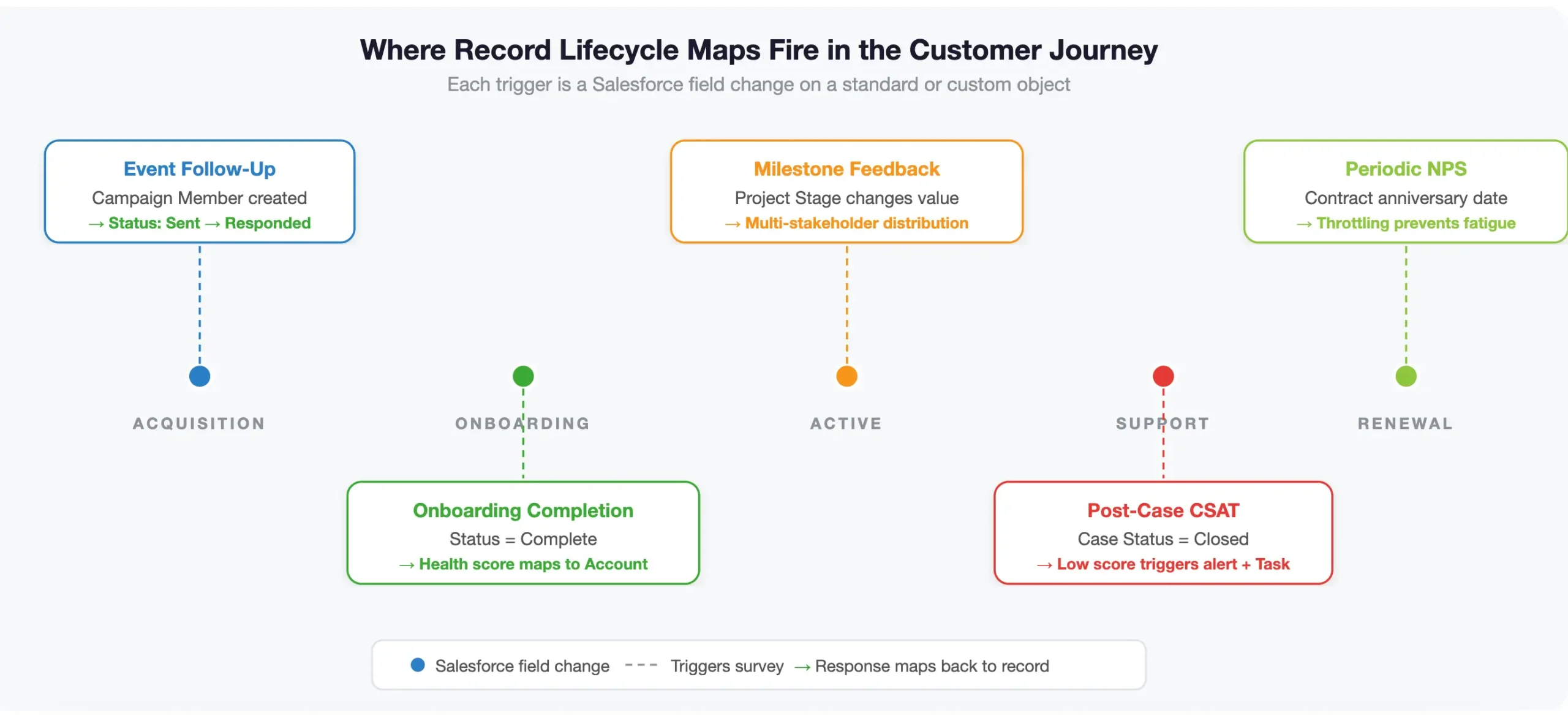
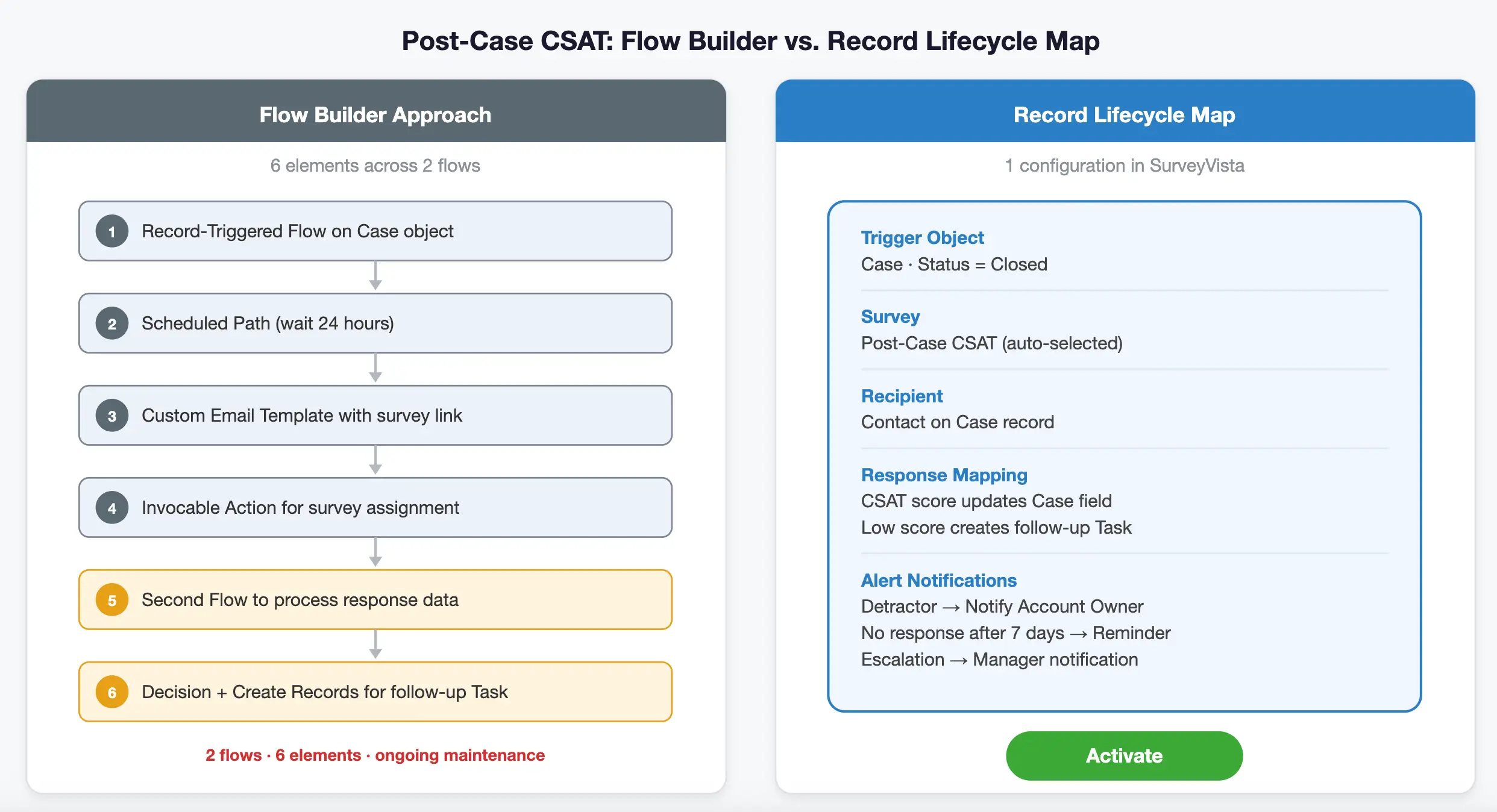
A Case record’s Status field changes to “Closed” and a satisfaction survey fires to the associated Contact. The response maps back to the Case record automatically using SurveyVista’s response mapping rules, which can update fields on the originating record, create related records, or both. If the score falls below your threshold, SurveyVista’s Advanced Alert Notifications fire immediately, notifying the Account owner, creating a follow-up Task, or escalating to a manager. The entire closed-loop motion happens without a single manual step. In a traditional setup, you would need a record-triggered flow with a scheduled path, a custom email template, an invocable action to create the survey assignment, and a second flow to process the response. With RLM, it is one configuration.
The SurveyVista knowledge base includes a step-by-step walkthrough for configuring completion notifications that shows exactly how the pieces connect.
Periodic NPS by Account Anniversary
Instead of mass-blasting NPS once a year to your entire customer base, RLM lets each account get surveyed relative to its own contract start date or renewal cycle. Salesforce supports scheduled paths on record-triggered flows that reference date fields, and RLM applies the same principle to survey orchestration — meaning timing is driven by data on the Account record, not by your fiscal calendar. SurveyVista’s built-in recipient throttling protects customers who may have multiple touchpoints firing in a short window, ensuring engagement without fatigue. The result is NPS data that reflects where each customer actually is in their relationship with you, not where your fiscal year happens to be.
Milestone Feedback from Multiple Stakeholders
When a project record or custom object hits a specific stage, collect structured feedback from every stakeholder tied to that record, not just the primary Contact. Engineering teams and implementation groups often need input from three or four people. RLM handles the distribution logic by referencing related Contact roles or junction object relationships, including the ability to trigger surveys to a Contact ID associated with an Opportunity or other parent record. Beyond dynamically selecting the right stakeholders, you can also configure recipient throttling to control how frequently any individual is surveyed — ensuring you gather signals across your stakeholder group without overwhelming the relationship.
This is one of the use cases where building the equivalent Flow would require nested loops and related record queries that add real complexity to your org. As Apex Hours notes in their discussion of technical debt in Salesforce, too many automations on a single object with overlapping triggers creates recursion issues and makes debugging increasingly difficult over time.
Onboarding Completion
A new customer finishes implementation. When the onboarding record is marked complete, a survey fires automatically and captures the experience while it is fresh. Research from Bain and Company via Harvard Business Review shows that a 5% increase in customer retention can increase profits by 25% to 95%. The onboarding window is where retention risk is highest, and it is also where feedback is most actionable because you can still course-correct.
Waiting three months to ask “how was your onboarding?” guarantees you are collecting nostalgia, not data. SurveyVista’s response mapping can immediately update a custom onboarding health score field on the Account, giving your success team a quantified signal right on the record where they already work.
Event Follow-Up
An Attendee or Campaign Member record is created at an event. A follow-up survey triggers automatically with merge fields personalizing the content based on which sessions or interactions were logged. Because the survey assignment is tied to the Campaign Member record, response mapping can update the Campaign Member status from “Sent” to “Responded” automatically, giving your marketing team attribution data that connects event spend to engagement quality without any manual CSV work.
Flow Got Better. Use It Where It Matters.
Salesforce ended support for Workflow Rules and Process Builder as of December 31, 2025. Flow Builder is now the platform’s sole automation engine. And with the Spring ’26 release, Flow is getting even more capable. As Salesforce Break highlights in their Spring ’26 release coverage, Agentforce can now generate and update record-triggered flows using natural language, Flow Builder supports collapsible branching elements for navigating complex automations, and canvas scrolling and debugging have both been significantly improved. The Salesforce Admins blog confirms that Flow is the backbone of modern automation, and Spring ’26 makes that backbone stronger.
None of that changes the core problem. The same SF Ben Admin Survey found that 64.7% of admins say the platform is becoming increasingly complex.
More powerful tools still require someone to build and maintain what those tools produce. Flow should be reserved for the automation that requires it: complex branching logic, multi-object updates, approval orchestrations, and the business processes unique to your org. Survey distribution is not unique to your org. Every organization that collects feedback at customer milestones is doing the same thing: watch a record, evaluate a condition, send a survey, map the response. It is a repeatable pattern, and repeatable patterns deserve a purpose-built tool rather than a custom build.
SurveyVista is 100% Salesforce-native, which means the entire RLM configuration lives inside your org’s metadata alongside your Flows, your objects, and your field definitions. There is nothing to connect, no middleware to monitor, and no sync to troubleshoot. For admins evaluating their automation landscape after the Workflow Rules retirement, the practical question is straightforward: do you want to build and maintain a custom Flow every time a stakeholder requests feedback at a new touchpoint, or do you want a purpose-built layer that handles survey orchestration while you focus your Flow expertise on the business logic that actually requires it?
What Happens After the Response Comes Back
Collection is only the first half of the equation. The real value of RLM is what happens when the survey comes back. It is worth clarifying how the pieces fit together. Response mapping is configured at the survey level, not within RLM itself. It evaluates answers in real time and creates or updates Salesforce records based on the results. RLM handles the trigger and distribution side — when to send, to whom, and under what conditions.
Used together, they produce the full closed-loop motion. A low CSAT score creates a Task or Case on the Account through response mapping. A high NPS response routes to your marketing team for referral or case study outreach. A neutral score can update a field on the underlying record, which RLM then monitors to fire a follow-up survey at the right moment. Advanced Alert Notifications let you schedule reminders at specific intervals after distribution — 7, 14, or 21 days after survey distribution — so if a participant has not responded, a reminder fires automatically. If a detractor score comes in, the relevant stakeholder is notified before the window to act closes.
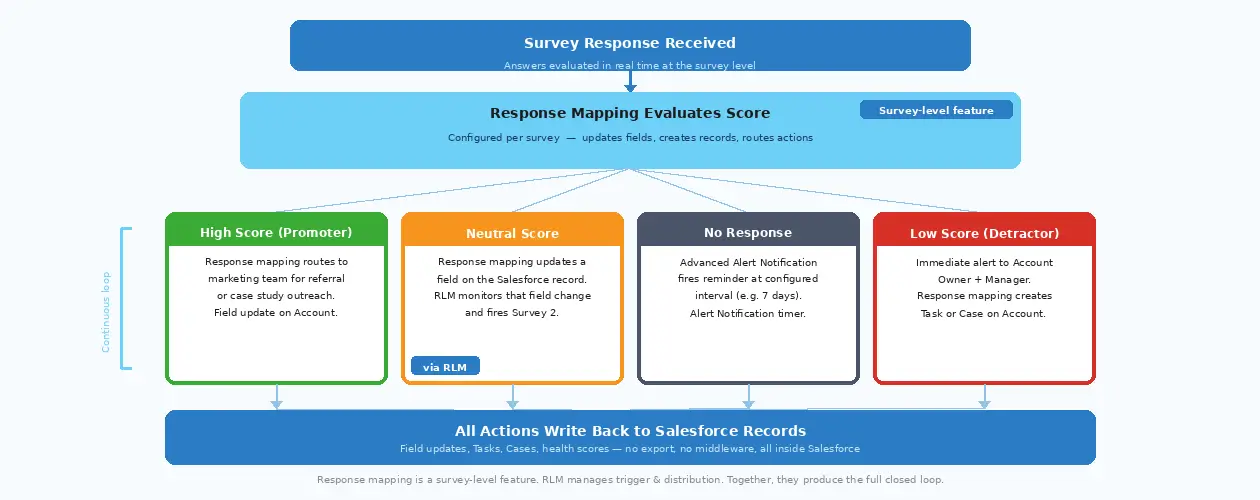
SurveyVista’s response mapping rules evaluate answers in real time and create or update Salesforce records based on the results. A low CSAT score creates a Task or Case on the Account. A high NPS response routes to your marketing team for referral or case study outreach. A neutral score triggers a follow-up survey through RLM’s survey chaining capability to see if the experience improved. Advanced Alert Notifications let you schedule alerts at specific intervals after distribution, so if a participant has not responded after 7 days, a reminder fires automatically. If a detractor score comes in, the relevant stakeholder is notified before the customer closes their browser.
In a landscape where 73% of Chief Sales Officers are now prioritizing growth from existing customers, every hour between a customer’s negative response and your team’s follow-up is revenue at risk. The map does not end at collection. The response triggers the next action, which may trigger the next survey, creating a continuous feedback loop tied to the customer’s actual journey inside your Salesforce org.
Stop Building Flows for Surveys
Most organizations are surprised at how many feedback moments already exist in their customer lifecycle. The onboarding milestone is there. The case resolution is there. The renewal cycle, the project stage gate, the event attendance record: they are all objects with fields that change at meaningful moments. The automation was always available. What was missing was a way to connect those moments to feedback collection without adding to your automation inventory.
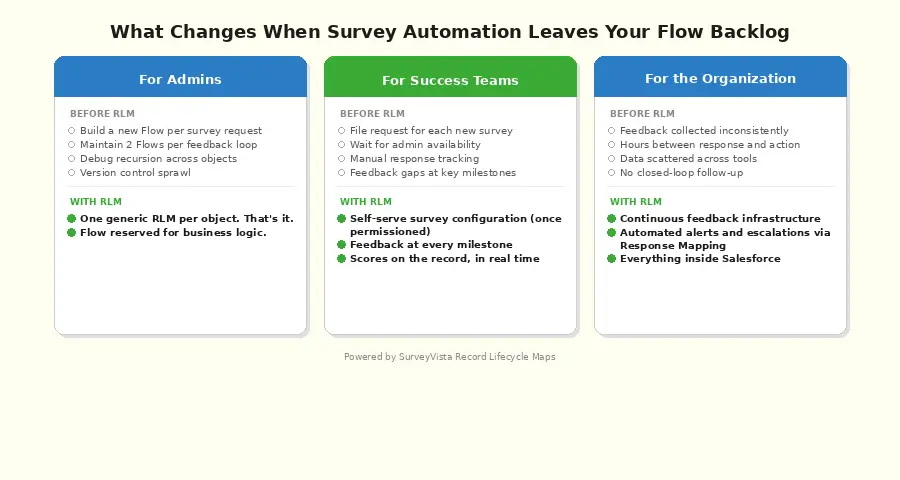
Record Lifecycle Maps turn feedback from a project someone has to build into infrastructure that runs on its own. For admins, that means fewer custom Flows to maintain at a time when Salesforce is pushing you toward building automation that scales. For success teams, it means feedback at every milestone without filing a request. For the organization, it means a closed-loop system that listens, acts, and follows up inside the platform where the work already happens.
You became a Salesforce admin to solve business problems, not to spend your afternoons maintaining survey Flows that all do the same thing. 450+ organizations use SurveyVista to automate feedback collection across their customer lifecycle without building custom Flows, and their admins got that time back. Book a demo and see what Record Lifecycle Maps look like with your objects, your field conditions, and your customer journey. Your backlog will thank you.
Perfect — for maximum AI Overview and Featured Snippet eligibility, we’ll:
- Shorten answers to ~40–70 words
- Start with a direct definition
- Remove narrative language
- Increase keyword precision (Salesforce Flow, survey automation, CSAT, NPS, closed-loop feedback)
- Keep answers self-contained
Below is the fully tightened, snippet-optimized FAQ set.
FAQ: Record Lifecycle Maps & Salesforce Survey Automation
-
How can I automate surveys in Salesforce without building multiple Flows?
You can automate surveys in Salesforce without custom Flows by using a Salesforce-native survey automation layer that monitors record changes and triggers surveys automatically.
Record Lifecycle Maps watch field updates (like Case Closed or Renewal Date), send the correct survey, and map responses back to Salesforce — without Apex, middleware, or additional Flow maintenance.
-
When should I use Salesforce Flow vs. a survey automation tool?
Use Salesforce Flow for complex business logic, multi-object updates, and approvals.
Use a purpose-built survey automation tool for repeatable patterns: monitor a record, evaluate conditions, send a survey, and write responses back to Salesforce. Offloading survey orchestration prevents Flow sprawl and reduces technical debt.
-
How do Record Lifecycle Maps automate CSAT and NPS in Salesforce?
Record Lifecycle Maps monitor standard or custom objects and trigger surveys based on field conditions.
Examples:
- Case Status = Closed → Send CSAT
- Account Anniversary Date → Send NPS
- Onboarding Complete = True → Trigger onboarding survey
Responses update Salesforce records in real time and trigger follow-up workflows automatically.
-
What is closed-loop feedback automation in Salesforce?
Closed-loop feedback automation connects survey triggers, response mapping, and workflow actions inside Salesforce.
Example:
- Low CSAT → Create Task
- Detractor NPS → Escalation alert
- Neutral score → Follow-up survey
This ensures customer feedback immediately drives action without manual exports or integration delays.
About SurveyVista
SurveyVista is the only 100% Salesforce-native Insights and Action Platform that captures intelligence across every customer touchpoint, transforming fragmented feedback into unified intelligence to reduce churn, grow revenue, and improve productivity — inside Salesforce. Leveraging AI to embed insights directly into Salesforce workflows, SurveyVista drives automated actions that deliver measurable results.
More Like This



Rajesh Unadkat 
Founder and CEO
Rajesh is the visionary leader at the helm of SurveyVista. With a profound vision for the transformative potential of survey solutions, he founded the company in 2020. Rajesh's unwavering commitment to harnessing the power of data-driven insights has led to SurveyVista's rapid evolution as an industry leader.
Connect with Rajesh on LinkedIn to stay updated on the latest insights into the world of survey solutions for customer and employee experience management.